Results 1 to 5 of 5
  1. #1
    Veteran v2freak's Avatar
    My Team
    San Antonio Spurs
    Join Date
    Feb 2006
    Post Count
    1,617
    I just had a question:

    I've got a Dell La ude D610 and a Dell Inspiron 1100 from years back when 128MB of ram was considered good. My question is, is it possible to put the gig of ram I have in the La ude, into the Inspiron? I want to upgrade the RAM on the La ude to 2 gigabytes - the max - but I sure wish/hope that the gig in it now could be put to better use.

  2. #2
    Don't stop believin' Dex's Avatar
    My Team
    San Antonio Spurs
    Join Date
    Nov 2004
    Post Count
    27,659
    I just had a question:

    I've got a Dell La ude D610 and a Dell Inspiron 1100 from years back when 128MB of ram was considered good. My question is, is it possible to put the gig of ram I have in the La ude, into the Inspiron? I want to upgrade the RAM on the La ude to 2 gigabytes - the max - but I sure wish/hope that the gig in it now could be put to better use.
    As long both ram chips are both the same build (for PC laptops, probably is going to be DDR2 SDRAM of some sort) and the same physical size, then technically it should work.

    The new ram you are adding (from the La ude) is probably going to have a faster max clock speed specification than the Inspiron's CPU is going to be capable of, but in that case I believe the new RAM should just slow down to match the system's clock speed. This would only be a problem if the system you were adding the RAM to required a HIGHER clock speed than the RAM is capable of.

    You may wanna get a second opinion before you go laying down any wads of cash tho. Ram shopping ain't easy these days.

  3. #3
    Moss is Da Sauce! mouse's Avatar
    My Team
    Dallas Mavericks
    Join Date
    Mar 2003
    Post Count
    26,358
    I upgrade the RAM all the time. Like DEX says....Just Google which notebook you have and it will say

    La ude D610 - Memory Upgrades
    Standard Memory: 256MB
    Maximum Memory: 2GB
    Total Expansion Sockets: 2
    Banks: 2 banks of 1
    System Notes: System supportsboth DDR2 400 and DDR2 533.

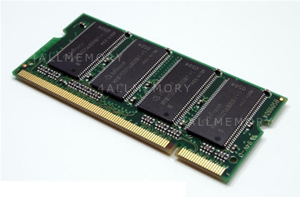
    Just make sure the pins match up. like the DELL 5100's use 200 pins and so on.

    If you need this?


    Then don't buy this.


    here is a chart.

    http://www.upgradememory.com/La ude_C15487.cfm


    I don't know why more people just don't upgrade their DELL's instead of buying new.

    You can find 1GB of ram for as low as 4-12 dollars if you keep checking eBay.

  4. #4
    Veteran v2freak's Avatar
    My Team
    San Antonio Spurs
    Join Date
    Feb 2006
    Post Count
    1,617
    Thank you both for your responses. I've never changed the RAM on a laptop - just desktops - so I am still a bit confused.

    Here is the information for a Dell Inspiron 1100


    Dell Inspiron 1100 Memory


    Maximum Memory 1GB
    Memory Slots 2 (2 banks of 1)
    non-removable base memory 0MB
    Machine name: Dell Inspiron 1100
    CPU options: Intel Celeron, Intel Pentium 4
    Chipset: Intel 845GL Chipset
    HD Bus:
    Front Side Bus options:
    Memory Speed options: PC2100 DDR266 200pin SDRAM SODIMM
    Special notes: The two SODIMM sockets are there - one is user-accessible and one is factory configurable.


    128MB Dell Inspiron PC2100 DDR SODIMM Memory (p/n 311-1350) $12.98


    256MB Dell Inspiron Notebook PC2100 DDR SODIMM (p/n 311-1353) $19.98


    512MB Dell Inspiron/La ude Notebook PC2100 DDR SODIMM (p/n 311-1356) $39.98

    I know if they are not compatible, I could just buy 1 gig of ram for the Inspiron and 2 gigs of ram for the La ude and just sell both that are in their respective units. But it'd be awesome if I could put the gig that is in the La ude right now into the Inspiron and save myself some trouble by just buying 2 gigs of ram. That way I only have to worry about buying the right kind of ram, once.

  5. #5
    Moss is Da Sauce! mouse's Avatar
    My Team
    Dallas Mavericks
    Join Date
    Mar 2003
    Post Count
    26,358
    DannyT has a D610 and the memory fit in my 5100 Inspiron I use the 200 pin RAM
    I am sure the 1100 Inspiron is 200 pins also so you should have no problem.

    Any updates?

Thread Information

Users Browsing this Thread

There are currently 1 users browsing this thread. (0 members and 1 guests)

Posting Permissions

  • You may not post new threads
  • You may not post replies
  • You may not post attachments
  • You may not edit your posts
  •