Results 1 to 10 of 10
  1. #1
    Drive For FIVE Spurologist's Avatar
    My Team
    San Antonio Spurs
    Join Date
    Jun 2005
    Post Count
    14,750
    What do I need?????

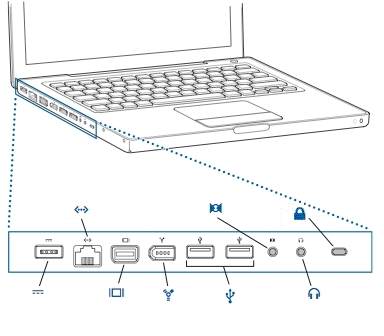
    These are my ports.


    I don't have any special connections on my tv.....just the 3 video/audio ports

  2. #2
    Crowned
    My Team
    San Antonio Spurs
    Join Date
    Jan 2004
    Post Count
    2,401
    When you say 3 video/audio ports, do you mean RCA? Red/Yellow/White? I haven't ever done it that way, but it should work.

    You'll need an adapter for the 3rd port from the left on your picture. Mini display port to RCA adapter. Now, this is daisy chaining it through a DVI, but this is the basic idea.

    http://www.amazon.com/GTMax-DisplayP.../dp/B0036CLS4Q


    This won't carry audio, though, so you'll need to play the audio out of the computer through speakers. Or, if you have a receiver, you can go through that as well.

  3. #3
    🏆🏆🏆🏆🏆 ElNono's Avatar
    My Team
    San Antonio Spurs
    Join Date
    Apr 2007
    Post Count
    153,473
    This is basically it:


    That's a Mini DisplayPort to S-Video/Composite adapter. You plug the composite output to the composite (yellow) input on your TV. Then there's a separate audio cable that goes from the audio out of the computer to the audio input (white/red) on your tv.

  4. #4
    Drive For FIVE Spurologist's Avatar
    My Team
    San Antonio Spurs
    Join Date
    Jun 2005
    Post Count
    14,750
    When you say 3 video/audio ports, do you mean RCA? Red/Yellow/White? I haven't ever done it that way, but it should work.

    You'll need an adapter for the 3rd port from the left on your picture. Mini display port to RCA adapter. Now, this is daisy chaining it through a DVI, but this is the basic idea.

    http://www.amazon.com/GTMax-DisplayP.../dp/B0036CLS4Q


    This won't carry audio, though, so you'll need to play the audio out of the computer through speakers. Or, if you have a receiver, you can go through that as well.
    Thanks.....I think that is what I need. By 3 audio/video ports I did mean RCA..didn't know that's what they were called.

    My only worry is if it will work. All I need is the RCA adapter cable...I might as well buy it if it's only $3. http://www.monoprice.com/products/pr...mat=4#feedback

    This is basically it:


    That's a Mini DisplayPort to S-Video/Composite adapter. You plug the composite output to the composite (yellow) input on your TV. Then there's a separate audio cable that goes from the audio out of the computer to the audio input (white/red) on your tv.
    I accidentally bought this from bestbuy. It doesn't fit into new ports on the macbook pro. I need the mini display port extension and that is the older apple DVI like in this pic

    http://store.apple.com/us/product/M9319G/A

  5. #5
    Clutch Technology Clutch's Avatar
    My Team
    San Antonio Spurs
    Join Date
    Apr 2010
    Post Count
    40
    Do you have an HDMI port? If so, that's all you need.

    Best of luck.

  6. #6
    🏆🏆🏆🏆🏆 ElNono's Avatar
    My Team
    San Antonio Spurs
    Join Date
    Apr 2007
    Post Count
    153,473
    I accidentally bought this from bestbuy. It doesn't fit into new ports on the macbook pro. I need the mini display port extension and that is the older apple DVI like in this pic

    http://store.apple.com/us/product/M9319G/A
    Sorry. I would have sworn my MBP uses mini-display port. Then again, it's a couple years old now.

  7. #7
    Drive For FIVE Spurologist's Avatar
    My Team
    San Antonio Spurs
    Join Date
    Jun 2005
    Post Count
    14,750
    Sorry. I would have sworn my MBP uses mini-display port. Then again, it's a couple years old now.
    no worries.....I'll just have your $1500 vbookie cash if you don't mind.

  8. #8
    Crowned
    My Team
    San Antonio Spurs
    Join Date
    Jan 2004
    Post Count
    2,401
    Thanks.....I think that is what I need. By 3 audio/video ports I did mean RCA..didn't know that's what they were called.

    My only worry is if it will work. All I need is the RCA adapter cable...I might as well buy it if it's only $3. http://www.monoprice.com/products/pr...mat=4#feedback
    The link I gave you has the DVI > RCA (component) cable included. It's the mini display port plus the cable. You can do the $3 one, and buy the MD port adapter separately. Might save you a few bucks.

    http://www.amazon.com/DisplayPort-Fe...4152803&sr=1-1


    It should work - assuming your TV accepts it. It essentially turns your TV into a secondary monitor. You can open up a video and drag it between the two screens.

    Good luck. Let me know if you run into issues - I have both TVs at the house set up for it.

  9. #9
    🏆🏆🏆🏆🏆 ElNono's Avatar
    My Team
    San Antonio Spurs
    Join Date
    Apr 2007
    Post Count
    153,473
    no worries.....I'll just have your $1500 vbookie cash if you don't mind.

  10. #10
    Drive For FIVE Spurologist's Avatar
    My Team
    San Antonio Spurs
    Join Date
    Jun 2005
    Post Count
    14,750
    The link I gave you has the DVI > RCA (component) cable included. It's the mini display port plus the cable. You can do the $3 one, and buy the MD port adapter separately. Might save you a few bucks.

    http://www.amazon.com/DisplayPort-Fe...4152803&sr=1-1


    It should work - assuming your TV accepts it. It essentially turns your TV into a secondary monitor. You can open up a video and drag it between the two screens.

    Good luck. Let me know if you run into issues - I have both TVs at the house set up for it.
    If it doesn't work, is it because of the type of tv I have?? Is there anything else I have to do other than set it up and go to the right input channel?? I'm thinking I probably have to change a setting on my macbook pro. Not sure though.

Thread Information

Users Browsing this Thread

There are currently 1 users browsing this thread. (0 members and 1 guests)

Posting Permissions

  • You may not post new threads
  • You may not post replies
  • You may not post attachments
  • You may not edit your posts
  •