Page 1 of 2 12 LastLast
Results 1 to 25 of 31
  1. #1
    GTL: Gym, Tan, Laundry Thunder Dan's Avatar
    My Team
    Cleveland Cavaliers
    Join Date
    Jun 2007
    Post Count
    7,665
    I work on a Dell computer all day at work that is running on Windows XP, built in 2002, has 256mb of RAM- basically the thing sucks balls. The thing freezes about 6 times a day. I can't multi task on it like listen to internet radio and do my required work. Everytime you do something on it you can hear it grinding away. I work for a company that requires me to upload and download a ton of pictures a day, and it takes forever to do that. The problem is, I can't just go ask for another computer because the heads are those types where if they see that it works, it's fine to use. So how can I destroy that thing enough so it looks natural? I'd like to take a hammer to it (I punch it and kick it during most days) but that would throw up a red flag. Is there a simple way to fry a harddrive or something?

  2. #2
    Veteran
    My Team
    Utah Jazz
    Join Date
    Dec 2007
    Post Count
    7,778
    I'd put a paper clip or small stick into the cpu fan so it can't spin and melt it [the cpu] to the mobo. Then again, you'd better hope they wouldn't check the fan after you were done.

  3. #3
    GTL: Gym, Tan, Laundry Thunder Dan's Avatar
    My Team
    Cleveland Cavaliers
    Join Date
    Jun 2007
    Post Count
    7,665
    I'd put a paper clip or small stick into the cpu fan so it can't spin and melt it [the cpu] to the mobo. Then again, you'd better hope they wouldn't check the fan after you were done.
    I just need to show them it doesn't turn on so that should work

  4. #4
    Basketball Expertise spurster's Avatar
    My Team
    San Antonio Spurs
    Join Date
    Aug 1999
    Post Count
    4,132
    Here's a couple of suggestions.


  5. #5
    Spur-taaaa TDMVPDPOY's Avatar
    My Team
    San Antonio Spurs
    Join Date
    Feb 2005
    Post Count
    40,864
    short circuit it

    when its running, throw in a screw towards the motherboard lmao

    or rub your feet on the carpet and hold something metalic and touch the motherboard to static it

  6. #6
    Believe. Lisa Jobs's Avatar
    My Team
    San Antonio Spurs
    Join Date
    Oct 2008
    Post Count
    41
    There is a red slide switch on the back of the power supply slide it from 110 to 220 and turn the pc back on, see a little smoke then order another pc.


  7. #7
    GTL: Gym, Tan, Laundry Thunder Dan's Avatar
    My Team
    Cleveland Cavaliers
    Join Date
    Jun 2007
    Post Count
    7,665
    short circuit it

    when its running, throw in a screw towards the motherboard lmao

    or rub your feet on the carpet and hold something metalic and touch the motherboard to static it
    will the latter suggestion hurt me also?

  8. #8
    #FreeGiuseppe BlackSwordsMan's Avatar
    My Team
    San Antonio Spurs
    Join Date
    Jul 2007
    Post Count
    14,648
    molest it and let it break down mentally

  9. #9
    bandwagoner fans suck ducks's Avatar
    My Team
    San Antonio Spurs
    Join Date
    Apr 2003
    Post Count
    68,241
    why not max out the ram

  10. #10
    bandwagoner fans suck ducks's Avatar
    My Team
    San Antonio Spurs
    Join Date
    Apr 2003
    Post Count
    68,241
    max the ram out because you work with pictures

  11. #11
    I love craft beer. Sense's Avatar
    My Team
    San Antonio Spurs
    Join Date
    Dec 2004
    Post Count
    10,775
    mess with the connections from the powersupply..

    you will get some smoke.. turn it off and get another one haha

    but what lisa jobs said would be the easiest way really...

  12. #12
    Out with the old... Obstructed_View's Avatar
    My Team
    San Antonio Spurs
    Join Date
    Apr 2005
    Post Count
    38,573
    let ducks work on it

  13. #13
    TheDrewShow is salty lefty's Avatar
    My Team
    San Antonio Spurs
    Join Date
    Oct 2006
    Post Count
    93,981

  14. #14
    TheDrewShow is salty lefty's Avatar
    My Team
    San Antonio Spurs
    Join Date
    Oct 2006
    Post Count
    93,981

  15. #15
    Veteran hater's Avatar
    My Team
    San Antonio Spurs
    Join Date
    Feb 2007
    Post Count
    55,274
    best way, take the CPU out and remove 1 of the pins with twezers

  16. #16
    GTL: Gym, Tan, Laundry Thunder Dan's Avatar
    My Team
    Cleveland Cavaliers
    Join Date
    Jun 2007
    Post Count
    7,665
    I'm on it now

    I'm working on transferring all my stuff onto my laptop, then I will blow this sucker up and get a new one

  17. #17
    Steele Curtain cherylsteele's Avatar
    My Team
    San Antonio Spurs
    Join Date
    Feb 2005
    Post Count
    3,315
    Install Vista

  18. #18
    9mm nkdlunch's Avatar
    My Team
    San Antonio Spurs
    Join Date
    Feb 2005
    Post Count
    11,497
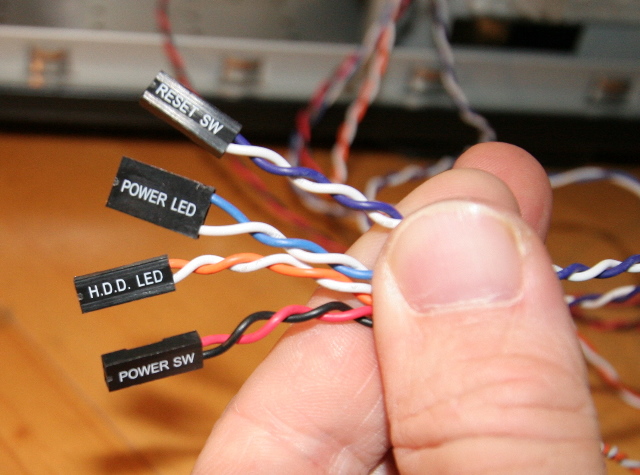
    locate the Power SW, switch the position of the wires. The computer will never turn on. They will never find out why

  19. #19
    Breaker of Derps RandomGuy's Avatar
    My Team
    San Antonio Spurs
    Join Date
    Jun 2005
    Post Count
    44,824
    There is a red slide switch on the back of the power supply slide it from 110 to 220 and turn the pc back on, see a little smoke then order another pc.

    This is your best option. It is quick, doesn't involve opening the case, and extremely likely to fry any computer circuitry.

    It will look just like a power surge or simple electrical failure.

    Just don't forget to switch the thing back to 110 or they will figure out what you did.

  20. #20
    Veteran hater's Avatar
    My Team
    San Antonio Spurs
    Join Date
    Feb 2007
    Post Count
    55,274
    This is your best option. It is quick, doesn't involve opening the case, and extremely likely to fry any computer circuitry.

    It will look just like a power surge or simple electrical failure.

    Just don't forget to switch the thing back to 110 or they will figure out what you did.
    don't think this works. This only works if your powersource is 220 and you switch it to 110.

  21. #21
    Basketball Expertise spurster's Avatar
    My Team
    San Antonio Spurs
    Join Date
    Aug 1999
    Post Count
    4,132
    Some more suggestions:


  22. #22
    Breaker of Derps RandomGuy's Avatar
    My Team
    San Antonio Spurs
    Join Date
    Jun 2005
    Post Count
    44,824
    don't think this works. This only works if your powersource is 220 and you switch it to 110.
    hmm. I really truly don't know. We are in the geek forum, so one can only hope there is somebody who knows.

    I do have a good friend who runs his own computer service company who would be good to ask about it. I'll try to remember to ask him. If anybody would know, it would be him.

  23. #23
    Believe. Saved By Zero's Avatar
    My Team
    Los Angeles Lakers
    Join Date
    Feb 2009
    Post Count
    154

    Just don't forget to switch the thing back to 110 or they will figure out what you did.

  24. #24
    Don't stop believin' Dex's Avatar
    My Team
    San Antonio Spurs
    Join Date
    Nov 2004
    Post Count
    23,338

  25. #25
    Don't stop believin' Dex's Avatar
    My Team
    San Antonio Spurs
    Join Date
    Nov 2004
    Post Count
    23,338
    zing!

Thread Information

Users Browsing this Thread

There are currently 1 users browsing this thread. (0 members and 1 guests)

Posting Permissions

  • You may not post new threads
  • You may not post replies
  • You may not post attachments
  • You may not edit your posts
  •